RESOURCES/EQUIPMENT:
Hardware:
 The first piece of hardware I intend to use is a HD video camera that will be used to capture various shots for my film trailer. This camera is easy to use and records in good quality, therefore making my film trailer realistic and professional. The camera will be acquired from the media studies department at Countesthorpe College and I will have to get a permission slip signed to cover the cost of replacement if it is damaged whilst I am using it.
The next piece of hardware I will use is a tripod, this will also be acquired from Countesthorpe College's media department. I will fix the video camera to the top of the tripod and then record the various shots I need by using the tripod handle to manoeuvre the camera. This will ensure a steady shot is used and it will make my production look polished and professional.
Next, I will use a sound recording device to capture the various types of sound required for the film trailer. The main use of this piece of hardware will be at the beginning when a radio announcement will be audible to the audience, informing them of a murder in the local area. Additionally the device could be used to capture realistic diegetic sound effects such as wind whistling, bushes rustling and twigs snapping. This piece of hardware will again be provided by the Countesthorpe College media department.

Finally, I will use an Apple Mac, provided by the college, to store all captured footage and then subsequently edit it all to create my media production. The Mac will also store all of the software need to edit my main production and create my ancillary tasks.
 Software:


iMovie and Final Cut = I will use a combination of both iMovie and FinalCut to edit together the main media product of the film trailer. I have used iMovie before on previous occasions and am fairly accustom to the layout and features within the software, it is quick and easy to use. Final Cut is a more advanced version of iMovie and offers more sophisticated options including colour matching and colour masking, settings that could enhance my production and make it more professional. Additionally, iMovie has audio editing features allowing me to edit various sound files for my media production. This software is available on the Macs and Macbooks in the Countsthorpe College media department.
Macromedia Fireworks = I will be using the graphical editing package Fireworks to create my ancillary tasks. I have used this software before and thoroughly understand how it works. It contains settings such as the pen tool and the blur tool, which will make the ancillary tasks look slick, polished and conforming to forms and conventions. Again this software is sourced from the Countesthorpe media department.
Microsoft Word = I will use the word processing software of Microsoft Word to type up various necessities for my production, including a script and other important textual documents e.g. shot list. This software is available on all computers at Countesthorpe and also on my laptop at home.
Free Sound = A potential way of acquiring sound for my production could be through Free Sound, an online piece of software that allows contributors to upload original sound files that can be used for others. These sound files are original and are therefore not breeching any copyright regulations, this software makes acquiring sound easier and more convenient. As this is internet software it is available on all of the Countesthorpe computers and on my laptop at home.
Garage Band = The final piece of software I may use is Garage Band, used for creating and editing music and sound files. I am not as familiar with this software as I am with aforementioned software so I am not yet fully confident with using this piece of software. As this is Apple software, this will only be available on the Countesthorpe media Macs and Macbooks.
ONLINE TUTORIALS AND RESPONSES:
Filming Tips:
Starts at 2:50
This online video tutorial provided a fascinating insight into how to film good video for my film trailer. I learnt a lot, including:
- The importance of light.
- Using colour filters to enhance camera shots.
- Place camera on a tripod to ensure a steady shot.
- Shoot in the highest resolution possible.
- Shoot as close as possible to the camera to ensure clear and audible sound.
Video Editing Tips:
- The importance of light.
- Using colour filters to enhance camera shots.
- Place camera on a tripod to ensure a steady shot.
- Shoot in the highest resolution possible.
- Shoot as close as possible to the camera to ensure clear and audible sound.
Video Editing Tips:
This online tutorial about the editing software iMovie was also beneficial and will result in a thorough editing process. Things I learnt when watching this video include:
- Ensure you split the clip in appropriate places to ensure continuity.
- When adding blank shots of text use contrasting colours for background and text e.g. white text on a black background.
- You can use the crop and rotate tool to fix any shots that don't quite fit correctly.
Photo Editing Tips:
I plan to use Macromedia Fireworks as the main editing software for my ancillary tasks, I therefore decided to research videos that would prove beneficial to creating my ancillary tasks. Things I learnt from this video include:
- Use the feather tool on level 7 when pasting in images that have been cut out so that edges are not jaded.
- When creating the original document ensure that the width and length are in pixels to by sure of maximum potential quality.
CAST/CONTRACTS/MODEL RELEASE FORMS:
Luke Creese (Zachary Copson): A local teenager who is murdered and found dead in a graveyard during the horror film trailer's opening.

This person has been chosen as he is the appropriate age to appeal to my chosen demographic, additionally he was ready and available to film at a short notice.
Dan Brown (Bradley Thompson): A friend of the murdered teenager who attempts to investigate the murder, forms part of a group of three main protagonists.

Joe Chapman (Jamie Hughes) Another friend of the murdered teenager, the second main protagonist.

Lennon Ford (Josh Wallace) The final member of the group of protagonists

The three aforementioned actors are all appropriate for their respective roles as all of them are aged 17-18 and will therefore relate to my chosen target audience. Furthermore, the three are all friends outside of their roles, therefore the friendship of the group on screen will be realistic and believable. Additionally, they have all been involved in previous media productions and therefore feel confident in front of the camera.
Dan Creese (Solebat) The film's main antagonist, a supernatural being who is concealed in the up at the local church, possess the power to bring people's nightmares to life.
I cast myself as the film's antagonist as he only appears in several shots within the trailer and therefore it will be relatively easy to capture these shots, additionally I won't be required to cast anybody else.
LOCATIONS:
Location 1 - A dark local park


This is the location I used for my media production last year, when creating the opening two minutes to a horror film. The location is local to me and is centred in a typically quiet neighbourhood, the park itself is used only very briefly meaning an efficient filming process. The location connotes isolation and the presence of a football pitch near it will appeal to my chosen target audience, many of whom admitted to playing football at venues similar to this on a weekly basis, therefore making it more relatable. Additionally, there is a collection of trees and bushes that could act as a concealed hiding spot for my antagonist.
I have decided against using this location to film my media production as I feel there are other locations more suited to evoking themes of darkness and isolation, additionally, since I have used it once before, I feel a different location would represent a better challenge.
Location 2 - Dark wooded area with surrounding houses


This next location follows a path from the grounds of Countesthorpe College to an entrance to the playing fields shared by both Countesthorpe College and Leysland High School. There are lots of trees on either side of the path way in this location creating a tense looking pathway that conforms to traditional horror film forms and conventions. Additionally, the compact style of this location will make is believable to the audience that a supernatural antagonist lurks amidst it. The compact style and vastness of the location would allow large parts of the film trailer's plot to take place here, additionally there is the opportunity to create lots of jump scares and terrify the audience.
All things considered I have decided not use this location as the central one for my media production, whilst it's true that, when utilised, this location could emphasise the forms and conventions of my horror film trailer, I believe it is a bit too cliché and one thing I recall from e-mailing my expert is the importance of being creative and original in this genre especially, therefore I have decided to try and find something more unique in order to maximise the success of my production.
Location 3 - Dark street:


The third potential location is a long dark street, this location is located across the road from Countesthorpe College, about three minutes away from location number two. When the area gets dark and the street lights come on, the location looks conventional of a typical horror film, connoting themes of isolation, darkness and fear of the unknown. Similarly to location number two, this location has trees situated on either side of the road, underlining the tension and the opportunity to create a rise in suspense when filming.
Ultimately, I have decided not to use this location as, similar to location number two, it is very clichéd and lots of previous horror films have utilised a similar location, and, as previously mentioned, I have been advised to select a unique location to base my horror film trailer.
Location 4 - Surrounding areas of a church and graveyard:


The final potential main location for my horror film trailer is the surrounding areas of a church and graveyard, also situated in Countesthorpe. The side area surrounded by gravestones and trees reinforces the themes of darkness and violence that are typical of the genre. The presence of a church adds a religious element to my horror film, thus making my supernatural antagonist more believable and realistic. The location should be easily accessible and gives me the opportunity to experiment with a variety of shots..
I have decided to use this location as the main setting for my horror film trailer, this will be the location where one of the characters is murdered, several other teenagers then go there to investigate where they come into contact with the main supernatural antagonist, whom is concealed in the church and graveyard area.
Additional Locations:
The structure of a film trailer dictates that a montage of shots covering the film's plot must take place. In order to do this I will need to include different locations to convey this, I have therefore decided to film at Countesthorpe Community College in one of the classrooms and also in a typical teenage bedroom. These locations will also appeal to the target audience making it more relatable.


RISK ASSESSMENT/LOCATION RELEASE:


COSTUME/PROPS:
Antagonist:

When it came to creating a visual representation for my supernatural antagonist I was inspired to create one in the same mould as Bughuul, the supernatural villain from the 'Sinister' film series, the first film of which, I did textual analysis on. The plain white face of Bughuul and the contrast of the darkness surrounding his face creates a chilling depiction and the fact there is no real detail in his face emphasises the rise in tension as we don't see his real identity. I aimed to create an equally disturbing antagonist in my film trailer, I purchased a plain black balaclava and a plain white mask from Amazon to use for my antagonist, subtly replicating the appearance of Bughuul in 'Sinister.'

 |
| My proposed supernatural antagonist 'Solebat' |
 |
| Bughuul from the horror film series 'Sinister' |
Protagonist:

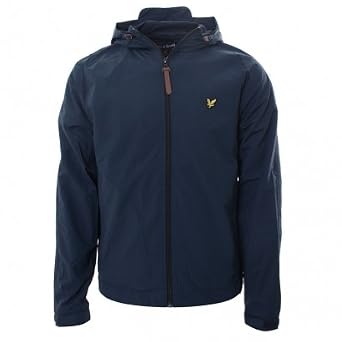


I was keen for my main group of protagonist to be dressed in a casual and trendy manner so that my target audience can relate to them, many of them claiming they enjoy purchasing clothes and trying out new brands. If the audience find the characters more relatable then they will engage more with the plot and by becoming immersed in the film itself they may find more scary. This is also seen in films such as 'The Hole' where teenage actors are used, they are dressed in more relaxed casual clothes to appeal to their own demographic, therefore this is something I aim to replicate in my horror film trailer.


As part of the montage of shots in the middle section of my horror film trailer, I will include various shots of the protagonist group researching the antagonist. This will focus on the protagonists looking on laptops and in books, a newspaper will be used to advertise the death of the teenage seen in the opening shots of the film trailer.
INSTITUTIONALISED REGULATION:
 When I received feedback from my questionnaire the most popular response for filming location was an abandoned house. Whilst I located an area that complied with this there were issues with permission to film there. The area was boarded up and the council claimed that anybody caught trespassing would be fined, so I decided to change my location to one that was legal and more easily accessible.
 Moreover, when it comes to adding sound to my production I have to ensure I used original sound tracks that are not owned by other groups or individuals. In order to achieve this I plan to use FreeSound, a previously mentioned website where users can upload and download various original sound clips and share them with one another.
BRAND IDENTITY:
|
Furthermore I plan to use images of the church across the different platforms too, this will also create the feeling of continuity and establish the film's brand.
Additionally, I planned to have the images of my protagonists facing away from the camera on the film poster, and then possibly having them face towards to camera and have the images captured from the other side to give a sense of convergence and continuity. I am not 100% convinced by this ideas, however, and will draft various other ideas and then seek feedback from my target audience before submitting my final ancillary tasks.
For my ancillary task of a Film Magazine front cover promoting my new film I will include the conventional layout and logo of a well-known, existing film magazine, either Empire or More Film.


I was unable to decide which film magazine brand to use so I asked members of my target audience which one they preferred. The results of which I organised into a pie chart.

I have now decided to use the Empire magazine brand as it was the most popular with my target audience.
MUSIC/SOUND:
For my film trailer's opening sequence I plan to have a radio announcement proclaiming the death of a teenager in the local area. This news report will be placed over the top of the opening shots of the trailer, helping to set the scene and introduce the plot.

First draft of report:
"Today's top story, the body of 16 year-old Zachary Copson was discovered outside St Andrew's Church in Countesthorpe this morning. The victim was rumoured to be visiting his grandfather's grave yesterday evening, supposedly when the murder took place. Police have taken in and examined the body, which was void of any lacerations or cuts, they are now asking anybody with any knowledge at all to come forward."
Second draft of report:
"Today's top story, local police discovered the body of 16 year-old Zachary Copson outside St Andrew's Church in Countesthorpe this morning. The body has been taken in and fully examined, it was void of any lacerations or cuts, they are now asking anybody with any knowledge at all to come forward."
UPDATE TO SOUND - WEEK BEGINNING 25th January 2016:
After collecting all the required clips for my production and having begun the editing stage, I have decided to not continue with the radio advert at the beginning of my trailer, mainly because I have a sequence just after where one of the protagonists is reading a newspaper article on the same murder. The two planned pieces sound almost identical so there was no point in having two pieces of sound that contain the exact same thing.
DRAFTING:
Film magazine:

I used the large Empire logo at the top of the page so that my poster conforms to forms and conventions of existing film magazine front covers, in addition to this I have included the phrase "MASSIVE SUMMER PREVIEW" just above the large title to draw in the audience to the content of the magazine. In terms of a main image I tend to have a shot from one of the clips from the film trailer, with the church in the distance and then the stairs and path way with trees either side. I will then have the three main antagonists facing the church, which will also engage the audience as they will want to understand their reasoning for approaching a seemingly ordinary church and its significance to the plot. A slogan will also be visible underneath the main logo, it will read "Your Number One Film Magazine." The use of the personal pronoun will also draw the audience in as it creates the illusion that the slogan is aimed directly at them, thus making the audience feel special.
I will also numerous the phrase "A SUPERNATURAL ENCOUNTER WORLD EXCLUSIVE!" to the left of the front cover, this will be so that it continues to engage the audience but it doesn't subtract from the main image, which will be the main selling point. Furthermore on the right hand side I have included the buzzword "PLUS!" which will also entice the audience to pick it up and read what it says. Underneath the word I plan to include other buzzwords such as "INTERVIEW," "BEHIND THE SCENES" and "REVIEW" in large fonts and bright colours to also entice the audience.
At the bottom of the magazine I plan to include images and names of three other films that the magazine features as part of the "preview" mentioned earlier. Again this will ensure that the magazine conforms to forms and conventions as this is commonly done on existing magazines, they attempt to advertise a lot of films to apply to as many different audiences as possible as they look to acquire greater profit. Moreover, the barcode will be featured on the side of the magazine to not divert the audience's attention but to also ensure the graphic looks as it should.
DEVELOPMENT:
- Select bright colours such as red, blue, yellow and white for the text to ensure it stands out and can be read easily.
- Insert images from the films advertised at the bottom to make it look more realistic.
Film Poster draft:

When doing research into the concept of cohesive marketing I discovered that in order to link products together you need to use one or two main images across various platforms. I have done this with my production using the image of the church in the trailer, magazine front cover and the poster, this is also the case for the image of my protagonist with the white mask and black balaclava. At the top of the poster I have included the names of my four main actors, this will make my poster conform to forms and conventions of existing film posters as they commonly place actors names somewhere on the poster to draw in audience members who might want to watch the film because of a specific actor.
Furthermore, I have included the title of my film 'A Supernatural Encounter' towards the top of the poster as, conventionally, that is where most poster's titles are positioned to the name is immersed in the minds of the audience. I have also included a slogan/enigma which mentally asks the audience and question and may draw them in to come and watch the film. Moreover, I have included a billing block to further adhere to forms and conventions in a bid to make my trailer look as realistic as possible. Amongst this billing block I have included social networking links to Facebook, Twitter and the film's own personal website. Finally, the age rating is situated in the bottom left hand corner so it is clear and easy to read.
DEVELOPMENTS:
- Add the image of my antagonist in a translucent format somewhere on the poster.
- Add images of the three main protagonists with either their back to the camera or facing the church.
SHOOTING SCHEDULE:
Day 1:

Day 2:

Unfortunately because of the snow on Saturday night, I was unable to film on Sunday as there would have been continuity issues when editing the various sequences together.
Having spoken to my actors for these shots we have decided to now film this sequence on Tuesday 19th January.
Day 3:

Day 4:

Day 5:


I decided to not include the shots taken from the final day of filming, the main reason behind this was the sheer volume of footage collected from the previous day's filming. Adding in the shots taken in on day five would have resulted in a film trailer of around three minutes in length which is too long and does not follow the forms and conventions of traditional film trailers.
SHOT LIST, STORYBOARD AND SCRIPT:
Initial list of shots and descriptions.
1)
The black screen fades out and centres on a close up shot is as the gate slowly
swings open.
2)
A medium
long shot then focuses on the back of an individual as he slowly moves
forward following the opening of the gate.
3)
A POV
shot will then be used from the angle of the supernatural antagonist who will
be lurking behind a tree nearby. The shot itself will capture the individual as
he walks up a small flight of steps.
4)
A medium
shot will then be taken from the side as the individual continues his
stroll.
5)
It will then briefly cut back to the POV shot from the antagonist still
lurking behind the tree. Just before the shot cuts back to the protagonist
though, the non-diegetic sound of a twig snapping and subsequent bushes
rustling will be heard near where the antagonist is hiding.
6)
The sound alerts the protagonist and a medium close up shot is quickly used as
we see his head turn in the direction of the noise and the antagonist’s hiding
place.
7)
An
over-the-shoulder shot will then be used from the protagonist’s view as he
stares at the hiding place.
8)
This will then cut to another POV shot from the antagonist’s angle as
he moves back whilst still concentrating on the protagonist’s movements.
9)
The same medium
close-up will again be utilised as we see the protagonist slowly turn and
back away, and walk off.
10)
The camera will then quickly cut to the same POV shot from the antagonist as he
charges forward at the protagonist who turns around at the last minute and lets
out a scream before the screen quickly fades to black.
11)
The camera will then cut to a long shot of his body lying on the
floor with the church visible in the background.
12)
This shot will then get progressively closer, so
it’s almost like the camera is zooming
in.
13)
It will then cut in to a medium close up shot of his dead body lying on the floor. The
camera may pan down just before this camera shot takes place.
Cross cut to a school
classroom:
14)
The image used in the last shot will be the
centre image on a local newspaper being read by a group of friends at school.
An over-the-shoulder shot will be
used as one individual member of the group is reading the story on the front.
15)
Whilst reading the story, a flashback will be
used. The POV shot of the antagonist
charging at the protagonist will be the camera shot used.
16)
A close
up shot of another male individual within the group describing the legend
of a supernatural antagonist.
17)
Whilst this explanation is going on numerous close up shots may be used on the main
protagonists of the trailer.
Cross cuts to the church and surrounding grave yard areas:
18)
A familiar close
up shot will be used on hands pushing open the gate to the church.
19)
A close
up shot of feet walking up the steps to the church will then be displayed.
20)
The camera will then tilt up and reveal the
three main protagonists, staring out at the church. A medium close up shot will be used here.
21)
A long
shot will then be used as the camera is positioned behind the protagonists
as they continue to stare out at the church.
22)
A medium
long shot will then be filmed from the side as the group continue to
investigate and continue walking forward. They hear a similar sound of twigs
snapping and bushes rustling as the protagonist in the trailer’s opening.
23)
The camera will then cut up to a close up shot of them turning towards
its location.
24)
An over-shoulder-shot
will then be use as the group walk forward and investigate where the sound came
from.
25)
A medium
close up will then be viewed from the opposite side as the group continue
to investigate.
26)
A POV
shot will then be used as more emphasis is placed on the location the group are
looking at.
27)
A medium
close up shot from the front will then track them beginning to turn around.
28)
Mid-way through the rotation the camera will cut
to a high-angle over-the-shoulder shot
from the main antagonist, who is stood behind them.
29)
Another cut is then present as the camera cuts
back around for an over-the-shoulder/medium
long shot of the antagonist, now stood in front of the group of
protagonists.
30)
The camera then cross cuts to a medium shot of
one of the protagonists talking about the antagonist they discovered.
31)
A close
up shot shows one of the protagonists typing on a keyboard.
32)
This shot then cuts to the computer screen
itself and the letters appearing in the search bar.
33)
It then cuts to a close up shot of the protagonists face.
34)
Again the camera cuts to a close up POV shot of the search results on the screen which depict
an image of the antagonist they encountered.
35)
Numerous medium
shots may then be used on other members of the group as the dialogue will
be continued over the previous shots.
36)
The camera then cross cuts to another one of the
individuals reading and turning pages in a book. A medium shot may be used here.
37)
This then cuts to an over-shoulder-shot of him turning another page and finding an image
of the same antagonist.
38)
The camera will then cut back to a low angle close up shot of his facial
reactions upon seeing that image. He will be looking scared and apprehensive.
Cross cuts to the
bedroom belonging to one of the protagonists:
39) A
close up shot will see the main
antagonist charging at the camera,
40)
The camera will then cut to a close up shot of one of the individuals
waking up from a supposed nightmare.
41)
A low-angle/over
the shoulder shot will then be used as the main antagonist suddenly appears
in the shot over the protagonist.
42)
The screen will then fade to black and display
the film’s title and appropriate social networking links.
Following on from creating an initial list of shots I decided to create a full shooting script that would be beneficial when creating my full visual storyboard later on:
Shooting Script:
FADE IN:
EXT – EARLY EVENING, overcast – THE SURROUNDING AREAS OF A CHURCH
AND GRAVEYARD:
CLOSE-UP SHOT
(CUS) – A hand of the protagonist pushes against a gate, it swings open and
he begins to walk through. The protagonist’s name is ZACHARY COPSON, 16 year
old teenager from the local area. He is dressed in a black coat with no hood, a
navy jumper with the hood sticking up from behind his collar and rest on the
back of his coat. Additionally he is wearing an unnoticeable white polo shirt,
a pair of jeans from Top Man and a pair of blue Adidas Originals Gazelles that
have been considerably worn down.
MEDIUM SHOT
(MS) – ZACHARY continues to walk through the gate in a casual yet
apprehensive manner. This camera shot will be taken from behind the protagonist
as he walks through the black rusty gates.
POINT-OF-VIEW
SHOT (POV) – This shot will be taken from the view point of a supernatural
antagonist who haunts the church. He is clocking ZACHARY’s movements from
behind a nearby bush. ZACHARY begins to casually stride to a flight of stairs
positioned near the gate he entered and close the church’s entrance.
CUS/HIGH ANGLE
SHOT (HA) – The camera will then focus on the protagonist’s feet as he climbs
the nearby flight of stairs. The camera may be positioned at a higher angle so
the audience are looking down on his feet on the stairs.
POV – The camera
shot cuts back to the view point of the antagonist as he continues to track the
movements of the protagonist as he climbs the stairs and continues walking to
the right of the screen.
MS – The
camera may pan around, tracking the protagonist’s movement as his walk
continues. During this shot the diegetic sound of bushes rustling and snapping
twigs will alert the protagonist and he will turn and look over his shoulder in
the direction of the concealed antagonist and the location of those sounds.
OVER-SHOULDER-SHOT
(OSS) – The camera will then focus on the direction the protagonist is now
staring with emphasise placed on the antagonists location.
POV – The
camera will cut back to the antagonist’s view point as the protagonist starts
walking towards him, cautiously and apprehensively with a look of intrigue
bestowed upon his face.
MS – The
next shot will be positioned in front of the protagonist, focusing on his
movement towards the concealed location, his hands remaining tucked in the
pockets of his coat. The final aspect of this shot will see the protagonist
extend his upper body and neck forward to catch a final glimpse of the source
of the aforementioned noises.
POV – The
camera quickly cuts to the viewpoint of the protagonist as he stares at the
antagonist’s location but is unable to discover him.
MS – The
camera then cuts back to the previous MS
and the protagonist withdraws his neck and upper body from their extended
positioned and begins to turn back around and walk off the other way, he head
still drawn towards the location until the last moment.
POV – The
camera will again cut back to the antagonist’s viewpoint, spotting that the
protagonist has turned and walked away the antagonist notices an opportunity to
strike, breaking from his hiding place and swiftly charging forward at the
protagonist. Upon noticing him the protagonist swiftly turns around and lets
out a scream before the screen fades to black.
EXTREME LONG
SHOT (ELS) – The camera fades back in from black and focuses on this shot
which focuses on the protagonist’s dead body lying on the floor near the
church. This shot will again fade to black at its conclusion.
LONG SHOT (LS)
– The camera fades back in from black and again focuses on the protagonist
who is lying on his back with arms and legs at a slight angle to his left hand
side. Again at the end the screen will fade to black.
MEDIUM LONG SHOT
(MLS) – The camera fades back in and focuses on the protagonist at a closer
view. The camera will again fade out.
MS – The
camera fades back in to a closer view this time before fading out again at the
end.
MEDIUM CLOSE UP
(MCU)/HA – For the final time the camera fades in and looks down on the
protagonist on the floor. The screen will then fade out and one of the film
company logos will be displayed.
RADIO REPORTER:
(READING) Today's
top story, the body of teenager Zachary Copson was discovered outside St
Andrew's Church this morning following a suspected murder yesterday evening.
The body is without fatal cuts and bruises and Police are now asking anybody
with any information to please come forward.
This piece of
dialogue will be audible over the top of the opening sequence of shots,
possibly during the fade in and fade out zooming stage of the dead body at the
end.
CUT
TO:
INT –
MORNING – IN THE COMMON ROOM AT COUNTESTHORPE COLLEGE:
The three main protagonists JOSH WALLACE, BRADLEY
THOMPSON and JAMIE HUGHES, as well as another protagonist are all sitting on
the L-Shaped sofa in their sixth form college common room. JOSH and BRADLEY are
sat next each other whilst JAMIE is sat on the other side of the sofa. TOM STAFFORD,
an outside is lurking around the area, whilst the rest of the protagonists are
looking at JOSH who is holding a newspaper and reading the story printed on the
front. JOSH is wearing black jeans, black trainers, an unseen grey t-shirt and a black coat, additionally he has short brown hair. BRADLEY is dressed in black denim jeans, unseen white trainers, he is also wearing a claret t-shirt and a silver watch, he has short dark brown hair that is brushed to one side. TOM is wearing a bright orange jumper with unseen grey tracksuit bottoms and black trainers. He has relatively short hair and is swaying from side-to-side.
OSS/HA –
This shot will show another protagonist clutching a local newspaper with both
hands. The newspaper’s front cover will have a large image of the final shot
from the previous sequence on the front cover along with the bold title above
it “LOCAL TEENAGER FOUND DEAD.”
JOSH WALLACE (Lennon Ford):
(READING) The
body of local teenager ZACAHARY COPSON was discovered outside St Andrews Church
in Countesthorpe this morning.
POV – The previously used viewpoint of
the antagonist attacking the protagonist will be used as a flashback whilst
JOSH continues to read the news story.
MS – The
camera cuts back to the front of JOSH who continues to read the story on the
newspaper.
JOSH WALLACE (Lennon Ford):
(READING)
Police have taken in and fully examined the body which was void of any cuts or
lacerations, leaving officers puzzled as to the cause of Copson’s death. They
are now asking anybody with any information to come forward immediately as they
begin the investigation.
MEDIUM CLOSE-UP
SHOT (MCU) – The camera will then cut to TOM who begins to explain to the
legend of a supernatural antagonist who supposedly haunts the church where
ZACHARY was found dead.
TOM STAFFORD (Jack Munn):
Rumour has it
that place is haunted by a legendary monster who brings your nightmares to
life. You encounter him in there, you ain’t getting out.
CUT TO:
EXT – LATE
AFTERNOON, THE SURROUNDING AREAS OF A CHURCH AND GRAVEYARD:
A sound bridge will be used as the dialogue spoken by
TOM continues over into the next couple of shots in the sequence.
CS – This
shot will focus on hands pushing open the gate, as seen before.
MCU – This
shot will capture the gate being opened and JOSH, BRADLEY AND JAMIE walking
through it from a different angle.
LS –
Another shot will concentrate on the three teenagers walking through the gate
and a few yards forward towards a flight of steps.
MS – This
shot will be captured from behind the trio as they walk a few paces and begin
to ascend up the stairs.
MCU/HA –
The next shot will centre on the feet of the protagonists as they climb the
flight of stairs.
LOW ANGLE SHOT
(LA) – Next the camera will be positioned up as it focuses on the trio
climbing up the final part of the stairs and then standing side by side at the
top, JAMIE on the left, JOSH in the centre and BRADLEY on the right.
POV – This
shot will be taken from the protagonists view point as they stare out at the
church, the same location ZACHARY was found dead.
LA/TILT –
The camera starts by focusing on the feet of the antagonist before the camera
tilts up and focuses on the faces of the trio who continue to stare out at the
church.
MLS – This
next shot will pan around as the trio walk forward in an apprehensive manner as
they begin investigating. During this shot JAMIE strolls about three yards
ahead of the other two.
MCU – The
camera will cut in closer to JAMIE’s face as the diegetic sound of twigs snapping
and bushes rustling, the same as what was audible to ZACHARY, alert him and he
turns towards its source.
OSS – The
shot will be taken from over JAMIE’s shoulder and places emphasis on the
location supposedly inhabited by the supernatural being.
MLS – This
shot will be taken from the front and shows JAMIE edge forward nervously
towards the location displaying emotional connotations of intrigue and
curiosity. Both JOSH and BRADLEY follow him in that direction.
MLS – The
same shot is taken from the reverse angle as the group continue to edge
forward.
MCU – This
shot again centres on JAMIE who edges forward on his own the right hand side of
the screen, he then takes one last look at the location.
POV – The
camera then cuts to a shot from the protagonist’s viewpoint centring on the
location.
MCU – The
camera cuts back to the previous MCU shot
and shows JAMIE swivel around.
OTS/HA –
Midway through rotation the camera cuts to a high angled shot over somebody’s
shoulder, JAMIE looks around and displays emotions of fear.
OTS – The
camera then cuts to a shot captured from over-the-shoulder of JAMIE,
concentrating on the supernatural antagonist positioned in front of him.
CUT TO:
INT –
MORNING – IN THE COMMON ROOM AT COUNTESTHORPE COLLEGE:
MS – The
camera focuses on JAMIE who is conversing with the other members of the group.
JAMIE HUGHES (Joe Chapman):
Somehow that
creature knows who we are…it knows our fears…and our worst nightmares. (This
sound will be used as a sound bridge and will be played over various other
shots)
CUT TO:
INT –
MORNING – IN AN EMPTY CLASSROOM:
MLS – The
camera focuses on JAMIE who is revising and looking through a text book.
OTS – Next
the camera cuts to over his shoulder as he continues flicking through the
pages. Hidden amongst one of the pages is a folded up piece of paper.
MLS – The
cuts back to the previous used MLS shot
and concentrates on him unfolding the piece of paper.
OTS – The
camera cuts back to the OTS of JAMIE
unfolding the paper revealing a threatening message.
CU/LA – The
camera looks up at JAMIE who looks down from the piece of paper and looks away,
displaying nervous and apprehensive emotions.
CUT TO:
INT –
MORNING – IN ANOTHER EMPTY CLASSROOM:
MCU –
BRADLEY is seen doing some research on a laptop in the classroom.
BRADLEY THOMPSON (Dan Brown):
What’s his
name?
CU – The
camera focuses on his hands typing on the keyboard
CU – The camera
then concentrates on the search bar on the computer screen where the name
SOLEBAT, is typed into it.
JAMIE HUGHES (Joe Chapman):
Solebat, the
ghost of nightmares
MCU – The camera
returns to the previous shot of BRADLEY staring at the laptop screen.
OTS – The camera
cuts to over BRADLEY’s shoulder where a large image of the antagonist is
displayed. BRADLEY then briefly looks away and the image on the laptop charges
forward at the screen.
CUT TO:
EXT – EARLY
EVENING, overcast – THE SURROUNDING AREAS OF A CHURCH AND GRAVEYARD:
EXTREME LONG
SHOT (ELS) – This shot focuses on ZACHARY, at a time period before his death,
investigating the church himself.
MLS – The camera
tracks him from the side as he walks on a few more yards. Before something
alerts him and he turns around.
POV – A shot
taken from ZACHARY’s view point as the supernatural antagonist charges at him.
POV – Cuts to
the shot from the antagonist’s perspective as the camera charges at the
protagonists. The screen will then fade to black.
CUT TO:
INT – EVENING,
DARK – A CONVENTIONAL TEENAGE BEDROOM:
EXTREME
CLOSE-UP (ECU) – This shot cuts to the eyes of ZACHARY opening as he awakes
from an apparent nightmare.
MLS – Next the
camera centres on him sitting up in bed and looking around for something.
POV – The camera
pans around the room several times to mirror the protagonist’s head movements.
MS – The camera
cuts back to the protagonists who looks relived and lies back down.
CU – This
shot will be taken from above the antagonist and simply shows him looking up,
towards to camera.
OTS/LA – This
shot will be looking up at the space visible above ZACHARY, the shot will pause
for a few moments and then the antagonist will rush in above him. The screen
then fades to black and the title is displayed.
FADE OUT:
END OF TRAILER.
Storyboard
After creating a rough list of shots and the shooting script I was able to create a storyboard to physically visualise shots that will take place:


FILMING SPACE:
Surrounding areas of a church and graveyard:

- The blue circles indicate where the camera will be positioned for the majority of the time and the green arrows represent my actor's movement throughout the set.
The common room at Countesthorpe College Sixth Form:

- This is the other location where my filming will take place, again the blue circles represent where the camera will be on the set.
ROUGH CUT:
First draft of production:
Audience feedback:
Eddie Timmins: "I was really impressed with your editing and the final film trailer looks professional and something you might see in the cinema or on TV."
Alex Hedley: "I enjoyed watching it and it was very professional, it encouraged me to want to watch the real film."
My media teachers then watched the first draft of my film trailer and then produced a small list of tweaks for me to make, to ensure that my production work complemented my research and planning.
They said:
- Change the location where Jack Munn is talking.
- Make some of the shots darker.
- Ensure the visuals fit the diegetic soundtrack.
- Add in more shots of the antagonist.
I took on board all of the advice and subsequently re-edited my production and uploaded a second draft which can be viewed on the 'Final Production' tab on this blog.
ANCILLARY TASKS:
Magazine front cover:

Analysis:

Additionally I asked members of my target audience to offer their opinions on my magazine front cover. The responses were as follows:
- Fix the Empire logo as it looks a little rough around the edges.
- Change the circular graphic in the bottom right hand corner to something more realistic
- "Your Number One Movie Magazine" just below the logo isn't very easy to read.
Below I have added images of changes I have made:
1)

2)

3)

After making several changes I showed the updated drafts of the magazine front cover to members of my target audience to obtain more ideas and opinions. They noted that the protagonists look artificial and the way they have been cut out from other images and pasted on looks less professional.
Film poster:

Analysis:

I again showed this idea to members of my target audience who gave me some feedback on how to improve. They said:
- Ensure consistency on the size of the text.
- Make some changes to the protagonists as you can tell they are photo shopped on.
This opinion of the protagonists looking rough and less conventional was sustained by my audience members across the two ancillary tasks. I have therefore decided to retake the images for the tasks and physically have my actors in shot so I don't have to cut them out and then insert them. I consulted with my actors and we decided we would re-shoot on Monday 21st March 2016.
Re-shooting was a success and below I have added drafts of the new ancillary tasks which I will again show my target audience and then decided which one will be the final piece.
Film poster:
1)


3)
4)

Film magazine front cover:
1)

2)


4)


No comments:
Post a Comment